Subtitles, mic routing, and stream-safe speech controls
Run live or offline speech capture, copy OBS browser source URLs, choose microphones, tune filters, and keep subtitle behavior app-wide across profiles.
VROmniStreamer
Native Windows stream control
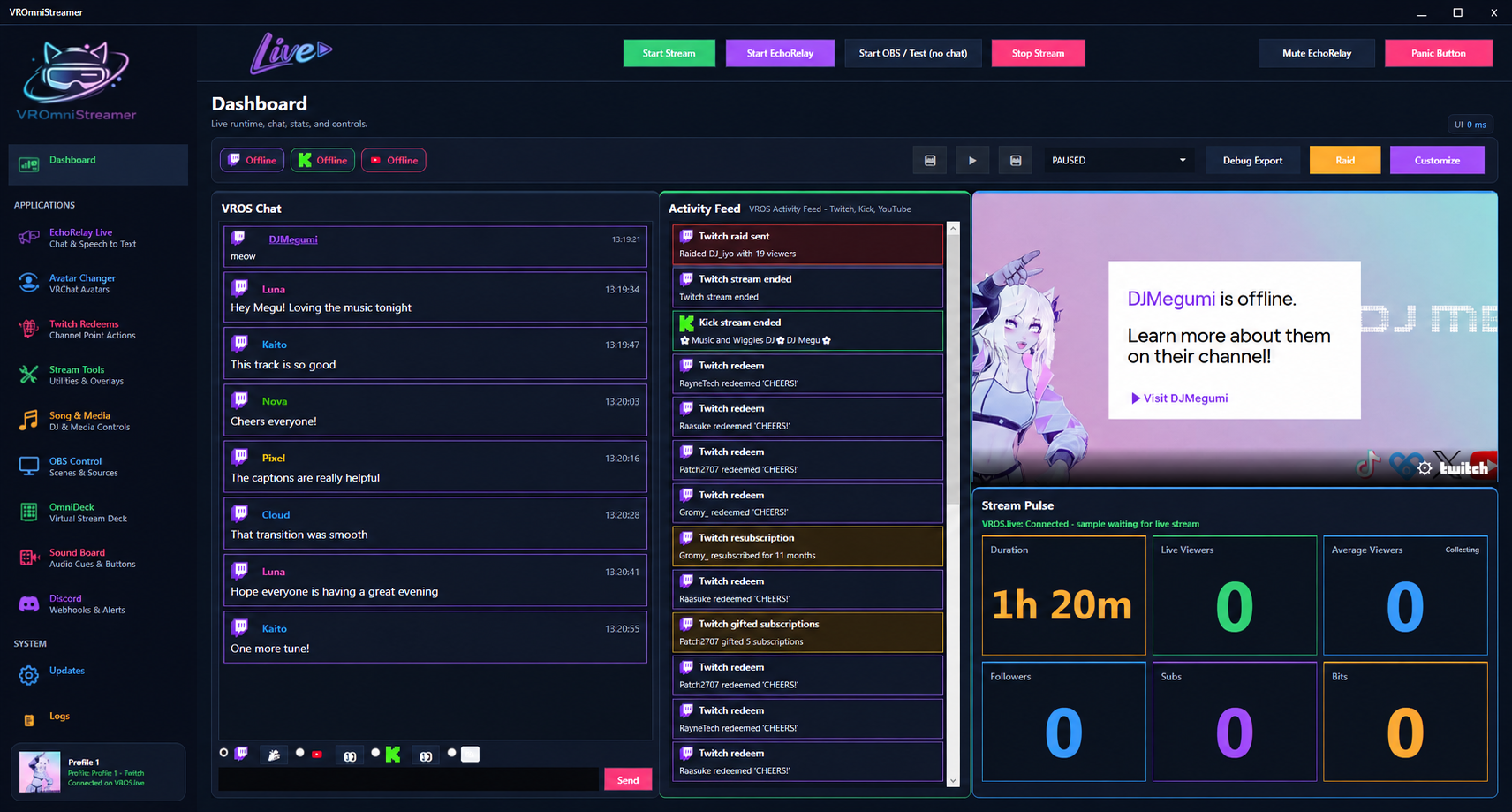
VROmniStreamer brings the busy parts of streaming into one native Windows console: server-collected chat, activity feeds, EchoRelay captions, Twitch/Kick/YouTube linking, VRChat avatar actions, OBS controls, overlays, media, and stream reports.
Real app screens
Keep live control surfaces in one native Windows app: speech tools, avatar workflows, channel point actions, OBS lifecycle controls, Spotify overlays, timers, stream health, and quick launch actions.
Run live or offline speech capture, copy OBS browser source URLs, choose microphones, tune filters, and keep subtitle behavior app-wide across profiles.
Twitch Redeems
Link channel points to app actions, avatar swaps, random pools, and blocked avatar changes.
Stream Tools
Use timers, overlay URLs, status widgets, stream health, and setup checks before going live.
Song & Media
Control Spotify now playing, playback, volume, and browser-source overlay styling.
OBS Control
Connect OBS WebSocket, start streams or recordings, refresh scenes, and switch scenes.
Two live modes
Dashboards, EchoRelay, Avatar Changer, Twitch Redeems, Stream Tools, Song and Media, OBS Control, logs, account login, and profile controls.
Moderation-friendly monitoring, redeem awareness, safer controls, stream support, and the same neon app language without unnecessary clutter.
App areas
Speech-to-text, OBS subtitle browser sources, Twitch chat relay, mute controls, duplicate suppression, punctuation, line breaks, and profanity filtering.
Fetch rewards, remember local records, link rewards to actions, listen for live redemptions, and drive specific or random VRChat avatar changes.
VRChat login, current avatar display, library sync, preview images, exclusions, OSC testing, avatar height actions, and redeem-triggered changes.
OBS WebSocket settings, start and stop stream controls, recording controls, scene switching, source detection, refresh tools, and auto-refresh options.
Spotify login, now-playing display, playback controls, volume handling, browser-source overlay styles, color controls, and animated artwork options.
Overlay timers, shoutout overlays, overlay manager URLs, stream health checks, setup wizard, and browser-source status widgets.
Dashboard
The dashboard is built around cards for live view, VROS Chat, Activity Feed, Stream Pulse, current avatar, readiness checks, media shortcuts, OBS shortcuts, runbook steps, and system awareness. Layouts can be customized so the app matches the way each streamer works.
Streamer workflow
The app starts with VROS account login and platform connections, then gives creators one surface for captions, chat, redeems, avatar automation, stream health, OBS state, Spotify playback, activity, and logs.
Stream Stats
Track stream duration, viewers, followers, subs, chat velocity, top redeems, most used avatars, raids, captions, avatar changes, Twitch emotes, and Unicode emojis. Records can be edited later when manual correction is needed.
OmniDeck
Launch a separate control deck for common actions such as OBS stream and recording controls, EchoRelay start/stop and mute controls, avatar height actions, and quick navigation back to key app screens.
Local site admin
The admin area is protected by a local server login. Use it to view site status, route checks, and future content controls for the VROmniStreamer website.